How To Guide
Right click the BlueZone.PasswordVault icon located in the Windows System Tray and choose Settings... from the pop-up window.
The main BlueZone.PasswordVault desktop application will launch defaulting to the Accounts screen.
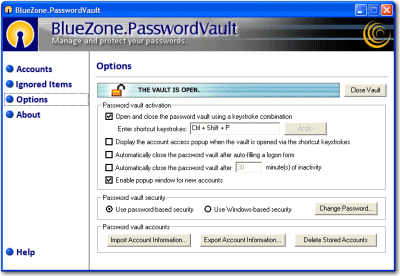
Click the Options button. The Options screen will be displayed, as shown here:
You can now choose your desired security method by choosing either "Use Password Based Security" or "Use Windows Based Security".
 NOTE
Windows
Based Security is a great feature that allows you to use your Windows
credentials to automatically log into BlueZone.PasswordVault. To
learn how to configure Windows Based Security, click
here.
NOTE
Windows
Based Security is a great feature that allows you to use your Windows
credentials to automatically log into BlueZone.PasswordVault. To
learn how to configure Windows Based Security, click
here.
Related Topics:
How to Use Windows Based Security