How To Guide
Right click the BlueZone.PasswordVault icon located in the Windows System Tray and choose Settings... from the pop-up window.
The main BlueZone.PasswordVault desktop application will launch defaulting to the Accounts screen.
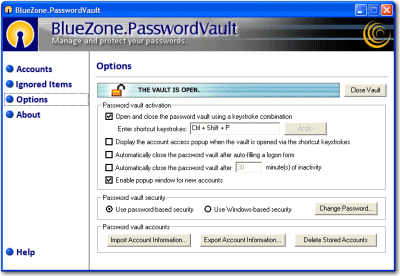
Click the Options button. The Options screen will be displayed, as shown here:
You can now change your password by clicking the Change Password... button.
A dialog will be displayed that will ask for your old password or the answer to your secret question. As long as you know the answer to your "secret question", you can reset your password.
Related Topics:
How to Switch Security Settings